GraphQL with AWS AppSync and Go Lambdas
6/19/2020

✏️ Summary
This post will review a simple project that was created to illustrate how to create a GraphQL API using AWS Appsync with Go Lambdas. Details outside the scope of this write-up will be fairly brief; however, links will be provided for additional research. We will cover the following parts of the project to build a broader understanding of how it all works together.
- Developer environment overview
- AWS prerequisites
- Project functionality
- Build and deployment
🧑💻 Developer Environment overview
I’ll do my best to list as many of the developer environment prerequisites as possible. However, if I miss anything, please just add an issue on the GitHub repository for this project.
- macOS / Linux / Windows using WSL configured with the Remote Developer extension. If using Windows, I’d recommend installing all the following requirements except VS Code in the WSL to avoid any issues trying to make things work with native Windows.
- VS Code is what is primarily used, but you are welcome to use any editor you enjoy
- Go
- AWS CLI
- make — This is not a requirement, but there is a Makefile included in the project that does some pretty heavy lifting 🏋️♂️
☁️ AWS prerequisites
-
An AWS account
-
The AWS CLI configured for that account
-
Lastly, AWS, to deploy this application to AWS it will require an IAM role with a policy that can deploy all the required resources. There are two options here.
- The first option is to just use the default profile that is configured when setting up the AWS CLI. This project is configured to support doing this via running make commands from the project’s Makefile. This option should be totally cool if you are just experimenting with AWS and don’t care much about security or automation.
-
The other option which is outside the scope of this post is creating an additional IAM user and policy to support publishing this project scoped securely via automation. If interested, this project is configured to use GitHub Actions to deploy the application to AWS on commits to the main branch.
⚠️
Just an extra FYI, the default role setup with the CLI is an admin account, so outside using it in your environment it’s not a good idea to share it anywhere else.
🏛 Project architecture
The project itself has a fairly basic set of features. It’s essentially a GraphQL service that provides a schema supporting CRUD operations on a coffee resource. It also includes additional Queries for getting random and all coffee resources. The random coffee query was specifically created to demonstrate the integration with Go.
🗂 Structure
├── Makefile # Makefile for project├── README.MD # Readme├── functions # Dir for functions (Makefile uses this convention for builds)│ └── getRandomCoffees # Dir for Lambda func and it's tests│ ├── main.go│ └── main_test.go├── go.mod # Go mod files├── go.sum # Go mod files├── models # Dir for go related models│ └── coffee.go├── request-mapping-templates # Request mapping templates for GraphQL resolvers│ ├── generic-result.res.vtl│ ├── mutation-delete-item-by-id.req.vtl│ ├── mutation-put-item-by-id.req.vtl│ ├── query-get-item-by-id.req.vtl│ ├── query-invoke-lambda.req.vtl│ ├── query-invoke-lambda.res.vtl│ ├── query-scan-all-items.req.vtl│ └── query-scan-all-items.res.vtl├── schema.graphql # GraphQL Schema└── template.yaml # AWS Cloudformation template💻 Implementation
💨 CloudFormation
The CloudFormation template links together the whole project. So we will dissect it section by section. Then, when it defines an external resource, we will dive into that code. Alright, let’s go 😎
Global
These are just the basic global values for the template. Two key things here are:
- The
ProjectNameparameter is used to prefix most of the names of the resources Functionsare set with some baseline configurations such as the Go runtime and Tracing enabled for debugging
AWSTemplateFormatVersion: 2010-09-09Transform: AWS::Serverless-2016-10-31
Parameters:  ProjectName:    Type: String
Globals:  Function:    Handler: handler    Runtime: go1.x    Tracing: Active
AppSync / GraphQL Services
Here we are defining the GraphQL API. The schema definition, which is also included below this snippet. Then we finish off by adding an API key to protect our API. The API key can be found in the AWS console in your Appsync applications settings.
AppSyncAPI:  Type: AWS::AppSync::GraphQLApi  Properties:    Name: !Ref ProjectName    AuthenticationType: API_KEY
AppSyncSchema:  Type: AWS::AppSync::GraphQLSchema  Properties:    ApiId: !GetAtt [AppSyncAPI, ApiId]    DefinitionS3Location: ./schema.graphql
AppSyncAPIKey:  Type: AWS::AppSync::ApiKey  Properties:    ApiId: !GetAtt AppSyncAPI.ApiId
GraphQL Schema
Here is the schema as it currently stands. Every type, input, query, and mutation has comments for basic documentation. The key divergence from the GraphQL spec is the @aws_api_key annotation to the top of the resource. This is an Appsync specific authorization mechanism to require an API key on resources.
"""A coffee type for our coffee resource type"""type Coffee @aws_api_key {  id: ID!  name: String!  origin: String!  roast: String!}
"""Create coffee input for our coffee resource type"""input CreateCoffee @aws_api_key {  name: String!  origin: String!  roast: String!}
"""Update coffee input for our coffee resource type"""input UpdateCoffee @aws_api_key {  id: ID!  name: String  origin: String  roast: String}
"""Delete coffee input for our coffee resource type"""input DeleteCoffee @aws_api_key {  id: ID  name: String  origin: String  roast: String}
"""Input for getting a random coffee"""input RandomCoffees @aws_api_key {  quantity: Int}
"""Connection type for our coffee resource to help support pagination"""type CoffeeConnection @aws_api_key {  items: [Coffee]  nextToken: String}
"""A type for the result of requesting a random coffee"""type RandomCoffeeResult @aws_api_key {  coffees: [Coffee]}
"""The queries our service supports"""type Query @aws_api_key {  """  Get a coffee resource by ID  """  getCoffee(id: ID!): Coffee  """  Get all coffee resources  """  allCoffees(nextToken: String): CoffeeConnection  """  Get a random set of coffee resources  """  getRandomCoffees(input: RandomCoffees): RandomCoffeeResult}
"""The mutations our service supports"""type Mutation @aws_api_key {  """  Create a coffee resource  """  createCoffee(input: CreateCoffee!): Coffee  """  Update a coffee resource  """  updateCoffee(input: UpdateCoffee!): Coffee  """  Delete a coffee resource  """  deleteCoffee(input: DeleteCoffee!): Coffee}
"""Our schema"""schema {  query: Query  mutation: Mutation}
Database Tables
We just have one database table to store the coffee resources. It just had one primary key, which is the coffee resource ID.
CoffeeTable: Type: AWS::DynamoDB::Table Properties: TableName: !Join [-, [!Ref ProjectName, "coffee"]] AttributeDefinitions: - AttributeName: id AttributeType: S KeySchema: - AttributeName: id KeyType: HASH BillingMode: PAY_PER_REQUESTAppSync Data Sources
In AppSync we need to link our resolvers to data sources. As of now, those can be DynamoDB tables, Elasticsearch, Lambda, HTTP endpoint, a relational database, and sometimes nothing in the case of doing something like a data transformation or invoking a subscription. In our example, we will be creating a data source for the coffee table and a lambda.
AppSyncGetCoffeeResolver:  Type: "AWS::AppSync::Resolver"  DependsOn: AppSyncSchema  Properties:    ApiId: !GetAtt AppSyncAPI.ApiId    TypeName: Query    FieldName: getCoffee    DataSourceName: !GetAtt AppSyncCoffeeDataSourceDynamo.Name    RequestMappingTemplateS3Location: ./request-mapping-templates/query-get-item-by-id.req.vtl    ResponseMappingTemplateS3Location: ./request-mapping-templates/generic-result.res.vtl
AppSyncCreateCoffeeResolver:  Type: "AWS::AppSync::Resolver"  DependsOn: AppSyncSchema  Properties:    ApiId: !GetAtt AppSyncAPI.ApiId    TypeName: Mutation    FieldName: createCoffee    DataSourceName: !GetAtt AppSyncCoffeeDataSourceDynamo.Name    RequestMappingTemplateS3Location: ./request-mapping-templates/mutation-put-item-by-id.req.vtl    ResponseMappingTemplateS3Location: ./request-mapping-templates/generic-result.res.vtl
AppSyncAllCoffeeResolver:  Type: "AWS::AppSync::Resolver"  DependsOn: AppSyncSchema  Properties:    ApiId: !GetAtt AppSyncAPI.ApiId    TypeName: Query    FieldName: allCoffees    DataSourceName: !GetAtt AppSyncCoffeeDataSourceDynamo.Name    RequestMappingTemplateS3Location: ./request-mapping-templates/query-scan-all-items.req.vtl    ResponseMappingTemplateS3Location: ./request-mapping-templates/query-scan-all-items.res.vtl
AppSyncDeleteCoffeeMutationResolver:  Type: "AWS::AppSync::Resolver"  DependsOn: AppSyncSchema  Properties:    ApiId: !GetAtt AppSyncAPI.ApiId    TypeName: Mutation    FieldName: deleteCoffee    DataSourceName: !GetAtt AppSyncCoffeeDataSourceDynamo.Name    RequestMappingTemplateS3Location: ./request-mapping-templates/mutation-delete-item-by-id.req.vtl    ResponseMappingTemplateS3Location: ./request-mapping-templates/generic-result.res.vtl
AppSyncResolverGetRandomCoffees:  Type: AWS::AppSync::Resolver  Properties:    ApiId: !GetAtt AppSyncAPI.ApiId    TypeName: Query    FieldName: getRandomCoffees    DataSourceName: !GetAtt AppSyncDataSourceGetRandomCoffeesLambda.Name    RequestMappingTemplateS3Location: ./request-mapping-templates/query-invoke-lambda.req.vtl    ResponseMappingTemplateS3Location: ./request-mapping-templates/query-invoke-lambda.res.vtl
For the sake of our example, let’s just examine the Lambda mapping templates.
Request
In the request, we are running the invoke operation. Then send the payload of the input arguments to the Lambda for processing. Notice also that the payload is wrapped in a utility function that parses the payload into JSON before sending to the lambda.
{ "version": "2017-02-28", "operation": "Invoke", "payload": $util.toJson($context.args.input)}Response
In the check for errors. If there is an error, we use the utility error function to throw an exception. Otherwise, we convert the result coming from the Lambda to JSON and send it back to the requester.
#if($ctx.error) $util.error($ctx.error.message, $ctx.error.type)#end$util.toJson($context.result)IAM Roles and Policies
Here we are creating two roles and polices for our resources. The first one is for the Appsync service. It essentially gives it access to our DynamoDB coffee table and the ability to invoke our get random coffees Lambda. The second one is for our get random coffees Lambda. It gives the Lambda ability to access resources such as DynamoDB coffee table, logging, and telemetry.
AppSyncIAMRole:  Type: AWS::IAM::Role  Properties:    RoleName: !Join [-, [!Ref ProjectName, "iam-role"]]    ManagedPolicyArns:      - Ref: AppSyncPolicy    AssumeRolePolicyDocument:      Version: 2012-10-17      Statement:        - Effect: Allow          Action:            - sts:AssumeRole          Principal:            Service:              - appsync.amazonaws.com  DependsOn:    - AppSyncAPI
AppSyncPolicy:  Type: AWS::IAM::ManagedPolicy  Properties:    Description: Managed policy to allow AWS AppSync to access the table    Path: /appsync/    PolicyDocument:      Version: 2012-10-17      Statement:        - Effect: Allow          Action:            - dynamodb:GetItem            - dynamodb:PutItem            - dynamodb:DeleteItem            - dynamodb:UpdateItem            - dynamodb:Query            - dynamodb:Scan            - dynamodb:BatchGetItem            - dynamodb:BatchWriteItem          Resource:            - !GetAtt CoffeeTable.Arn        - Effect: Allow          Action:            - lambda:invokeFunction          Resource:            - !GetAtt LambdaGetRandomCoffees.Arn
LambdaGetRandomCoffeesIAMRole:  Type: AWS::IAM::Role  Properties:    RoleName: !Join [-, [!Ref ProjectName, "get-random-coffees-iam-role"]]    ManagedPolicyArns:      - Ref: LambdaGetRandomCoffeesPolicy    AssumeRolePolicyDocument:      Version: 2012-10-17      Statement:        - Effect: Allow          Action:            - sts:AssumeRole          Principal:            Service:              - lambda.amazonaws.com
LambdaGetRandomCoffeesPolicy:  Type: AWS::IAM::ManagedPolicy  Properties:    Description: Managed policy to allow AWS AppSync to access the tables created by this template.    Path: /appsync/    PolicyDocument:      Version: 2012-10-17      Statement:        - Effect: Allow          Action:            - dynamodb:Query            - dynamodb:Scan          Resource:            - !GetAtt CoffeeTable.Arn        - Effect: Allow          Action:            - xray:PutTraceSegments            - xray:PutTelemetryRecords          Resource:            - "*"        - Effect: Allow          Action:            - logs:CreateLogGroup            - logs:CreateLogStream            - logs:PutLogEvents          Resource:            - "*"
Lambda
Then, of course, is our main purpose of this post, which is our Go Lambda. The CloudFormation portion below uses conventions based off the Makefile to produce the binaries which are uploaded to AWS and mapped to our other services. The last line is probably the most important, it defines an environment variable called COFFEE_TABLE_NAME. This dynamically assigns the table name to the Lambda environment, allowing it to utilize it within the code at runtime.
⚠️
This environment variable will need to be assigned for local development.
LambdaGetRandomCoffees: Type: AWS::Serverless::Function Properties: FunctionName: get-random-coffees CodeUri: ./dist/getRandomCoffees Timeout: 20 Role: !GetAtt LambdaGetRandomCoffeesIAMRole.Arn Environment: Variables: COFFEE_TABLE_NAME: !Ref CoffeeTableFor the sake of clarity, let’s first just briefly review our coffee model. Nothing special here, just wanted to make sure it’s listed here for future reference.
models/coffee.go
package models
type Coffee struct {  Id string `json:"id"`  Name   string `json:"name"`  Origin string `json:"origin"`  Roast  string `json:"roast"`}
main.go
The main program should be fairly well commented for understanding as to what’s going on. The important piece is that there is a handler function which is a parameter for the Lambda. Start function, which turns this into a Lambda. The cool thing is we can test it all locally, and in fact there are two tests for generating test data and for retrieving it.
package main
import (  "basic-graphql-with-appsync/models"  "log"  "math/rand"  "os"
  "github.com/aws/aws-lambda-go/lambda"  "github.com/aws/aws-sdk-go/aws"  "github.com/aws/aws-sdk-go/aws/session"  "github.com/aws/aws-sdk-go/service/dynamodb"  "github.com/aws/aws-sdk-go/service/dynamodb/dynamodbattribute"  "github.com/aws/aws-sdk-go/service/dynamodb/expression")
// defines the payload expected from the resolver requesttype RandomCoffeesPayload struct {  Quantity int `json:"quantity"`}
// defines the result the resolver expects as a responsetype RandomCoffeesResult struct {  Coffees []models.Coffee `json:"coffees"`}
// Handle: handles the lambda request for random coffee resourcesfunc handle(payload RandomCoffeesPayload) (RandomCoffeesResult, error) {
  // defines the result for future use  randomCoffeesResult := RandomCoffeesResult{}
  // creates a new AWS session  sess, err := session.NewSession(&aws.Config{})
  // log an error if the session cannot be created and return back an empty result  if err != nil {    log.Printf("%v", err)    return randomCoffeesResult, err  }
  // creates a new dynamodb service  svc := dynamodb.New(sess)
  // grabs the coffee table name from the env  tableName := os.Getenv("COFFEE_TABLE_NAME")
  // creates a namelist to be used as part of a expression builder defining the values to return back from the db  project := expression.NamesList(expression.Name("id"), expression.Name("name"), expression.Name("origin"), expression.Name("roast"))
  // creates a new expression builder  expr, err := expression.NewBuilder().WithProjection(project).Build()
  // if there is an issue building the expression we log an error and return back an empty result  if err != nil {    log.Printf("Got error building expression:")    return randomCoffeesResult, err  }
  // defines all the parameters for scanning dynamodb  params := &dynamodb.ScanInput{    ExpressionAttributeNames:  expr.Names(),    ExpressionAttributeValues: expr.Values(),    ProjectionExpression:      expr.Projection(),    TableName:                 aws.String(tableName),  }
  // performs a scan on dynamodb to grab coffee resources  result, err := svc.Scan(params)
  // if there is an issue with the scan we log it and return back an empty result  if err != nil {    log.Printf("Query API call failed:%s", err.Error())    return randomCoffeesResult, nil  }
  // if there is no coffee resources in the result we log it and return back an empty result  if len(result.Items) == 0 {    log.Printf("Result returned by 0 items")    return randomCoffeesResult, nil  }
  // define a new slice to store our coffee resources  var coffees []models.Coffee
  // unmarshal the list of resources so we can go use them  err = dynamodbattribute.UnmarshalListOfMaps(result.Items, &coffees)
  // if there is an issue with the unmarshal we log it and return back an empty result  if err != nil {    log.Printf("Error unmarshaling results from dynamodb: %s", err.Error())    return randomCoffeesResult, nil  }
  // gets some random coffee resources very inefficiently  randomCoffees := inefficientKindaRandomResult(coffees, payload.Quantity)
  // adds the coffee resources to our result  randomCoffeesResult.Coffees = randomCoffees
  // prints out the final result for logging  log.Printf("Final output: %v", randomCoffeesResult)
  // returns the result  return randomCoffeesResult, nil}
// inefficientKindaRandomResult: inefficiently returns back kinda random results of coffee resourcesfunc inefficientKindaRandomResult(coffees []models.Coffee, quantity int) (randomCoffees []models.Coffee) {
  // check if the quantity is defined, if it doesn't it just set the quantity to 1  if quantity == 0 {    quantity = 1  }
  // iterates over a slice of coffees  for i := range coffees {    // generates a random int to be used in scrambling some coffee orders    j := rand.Intn(i + 1)    coffees[i], coffees[j] = coffees[j], coffees[i]  }
  // creates new coffee slices out of the previously scrambled slices  randomCoffees = append([]models.Coffee{}, coffees[:quantity]...)
  // returns back the inefficiently randomized kinda random results haha  return randomCoffees}
func main() {  lambda.Start(handle)}
Outputs
And of course, we have some outputs that will be outputted after the CloudFormation is executed successfully. These include the GraphQL API URL and API key required for the requests.
Outputs: GraphQL: Description: GraphQL URL Value: !GetAtt [AppSyncAPI, GraphQLUrl] AppsyncApiKey: Description: GraphQL API Key Value: !GetAtt [AppSyncAPIKey, ApiKey]🏗 Build and 🚢 Deployment
So for the build process, it’s fairly streamlined using the included Makefile. Again, it has comments for almost everything it does and what needs to be defined to run it. An example of how this can be used in automation can be found in the .github/workflows/go.yaml, which is used for the GitHub Actions workflow. ⚠️ The project name will have to change because S3 buckets are global.
If one were starting off fresh with this project and had all the environment requirements. They could deploy this whole application by running the following commands:
Install all the go modules
make installBuild the project
make buildCreate S3 buckets for artifacts
make s3Package the project for the CloudFormation deploy
make packageDeploy the project via CloudFormation
make deployMakefile
##############################################################################################                Build Configuration                       ##############################################################################################
# the project name used throughout the process to define created resourcesPROJECT_NAME ?= basic-graphql-with-appsync
# AWS S# bucket created to store the project artifactsAWS_BUCKET_NAME ?= $(PROJECT_NAME)-artifacts
# AWS S3 bucket created to store the Cloudformation stack artifactsAWS_STACK_NAME ?= $(PROJECT_NAME)-stack
# AWS region to deploy resources toAWS_REGION ?= us-east-1
# Cloudformation template for projectFILE_TEMPLATE = template.yaml
# Cloudformation template package name to be generated fromFILE_PACKAGE = package.yaml
# operating system target for go build https://golang.org/pkg/runtime/GOOS ?= linux
# dir for funcs used by build processPATH_FUNCTIONS := ./functions/
# used to dive into the above funcs dir to get all funcsLIST_FUNCTIONS := $(subst $(PATH_FUNCTIONS),,$(wildcard $(PATH_FUNCTIONS)*))
##############################################################################################                Build Job / Task Definitions#############################################################################################
# cleans the distrubution directoryclean:  @ rm -rdf dist/
# installs go modsinstall:  @ go mod download
# runs go teststest:  @ go test ./... -v
# instructions for a standard build of a go funcbuild-%:  @ env GOOS=linux \    go build \    -gcflags "all=-N -l"  \    -o ./dist/$*/handler ./functions/$*
# instructions for a debug build of a go funcdebug-%:  @ env GOOS=linux \    go build \    -a -installsuffix cgo -ldflags="-s -w " \    -o ./dist/$*/handler ./functions/$*
# build stepbuild:  $(info Building: $(LIST_FUNCTIONS))  @ $(MAKE) clean  @ $(MAKE) $(foreach FUNCTION,$(LIST_FUNCTIONS),build-$(FUNCTION))
# debug stepdebug:  $(info Building: $(LIST_FUNCTIONS))  @ $(MAKE) clean  @ $(MAKE) $(foreach FUNCTION,$(LIST_FUNCTIONS),build-$(FUNCTION))  @ $(MAKE) dlv
# generates .env file for local developmentenv:  echo \  "COFFEE_TABLE_NAME=${PROJECT_NAME}-coffee\n"\  "AWS_REGION=${AWS_REGION}\n"\  "AWS_SDK_LOAD_CONFIG=1\n"\  > .env
# helper to grab dlv for local debuggingdlv:  $(info Building Task: Dlv)  @ env GOARCH=amd64 GOOS=linux go build -o dist/dlv github.com/go-delve/delve/cmd/dlv
# creates s3 buckets for project artifactss3:  @ aws s3 mb s3://$(AWS_BUCKET_NAME) --region $(AWS_REGION)  @ aws s3 mb s3://$(AWS_STACK_NAME) --region $(AWS_REGION)
# packages the resources for cloudformation deploy steppackage:  @ aws cloudformation package \    --template-file $(FILE_TEMPLATE) \    --s3-bucket $(AWS_BUCKET_NAME) \    --region $(AWS_REGION) \    --output-template-file $(FILE_PACKAGE)
# deploys projects cloudformation resourcesdeploy:  @ aws cloudformation deploy \    --template-file $(FILE_PACKAGE) \    --region $(AWS_REGION) \    --capabilities CAPABILITY_NAMED_IAM \    --stack-name $(AWS_STACK_NAME) \    --force-upload \    --s3-bucket $(AWS_BUCKET_NAME) \    --parameter-overrides \      ProjectName=$(PROJECT_NAME) \
# describes the cloudformation stackdescribe:  @ aws cloudformation describe-stacks \    --region $(AWS_REGION) \    --stack-name $(AWS_STACK_NAME)
# cleans up resources not associated with cloudformation stack, ex S3cleanup:  @ aws s3 rb s3://$(AWS_BUCKET_NAME) --region $(AWS_REGION) --force  @ aws s3 rb s3://$(AWS_STACK_NAME) --region $(AWS_REGION) --force
# describes output of stackoutputs:  @ make describe \    | jq -r '.Stacks[0].Outputs'
.PHONY: clean install test build build-% debug debug-% env dlv s3 package deploy describe cleanup output
🔦 Validating The Service
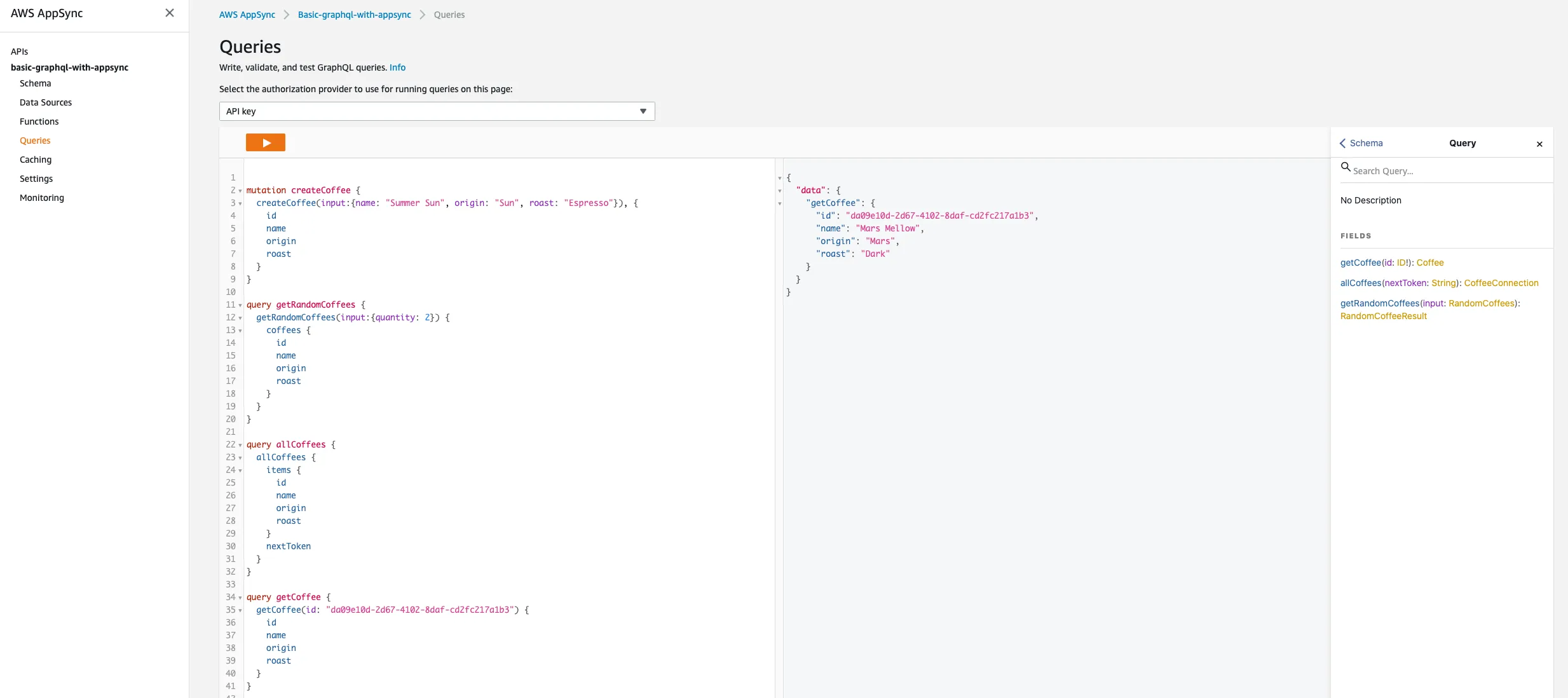
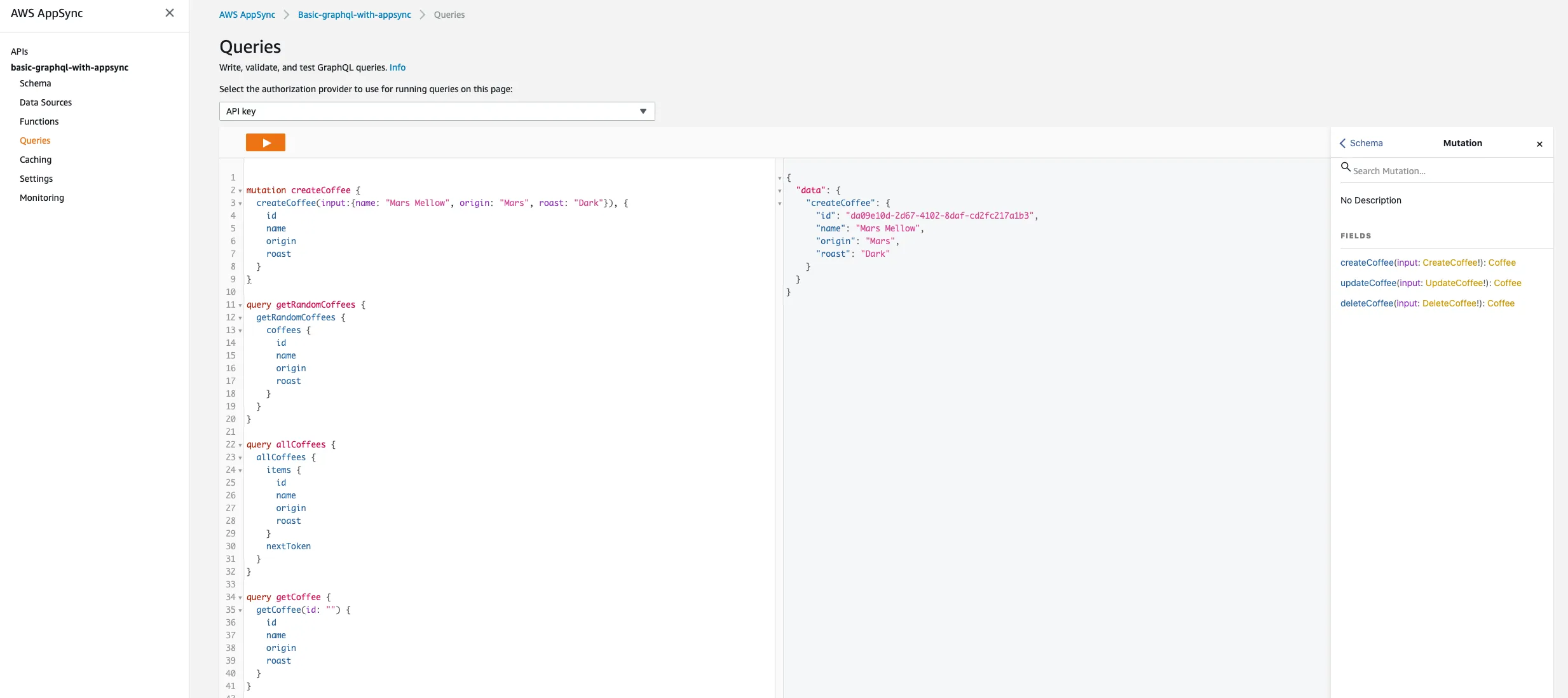
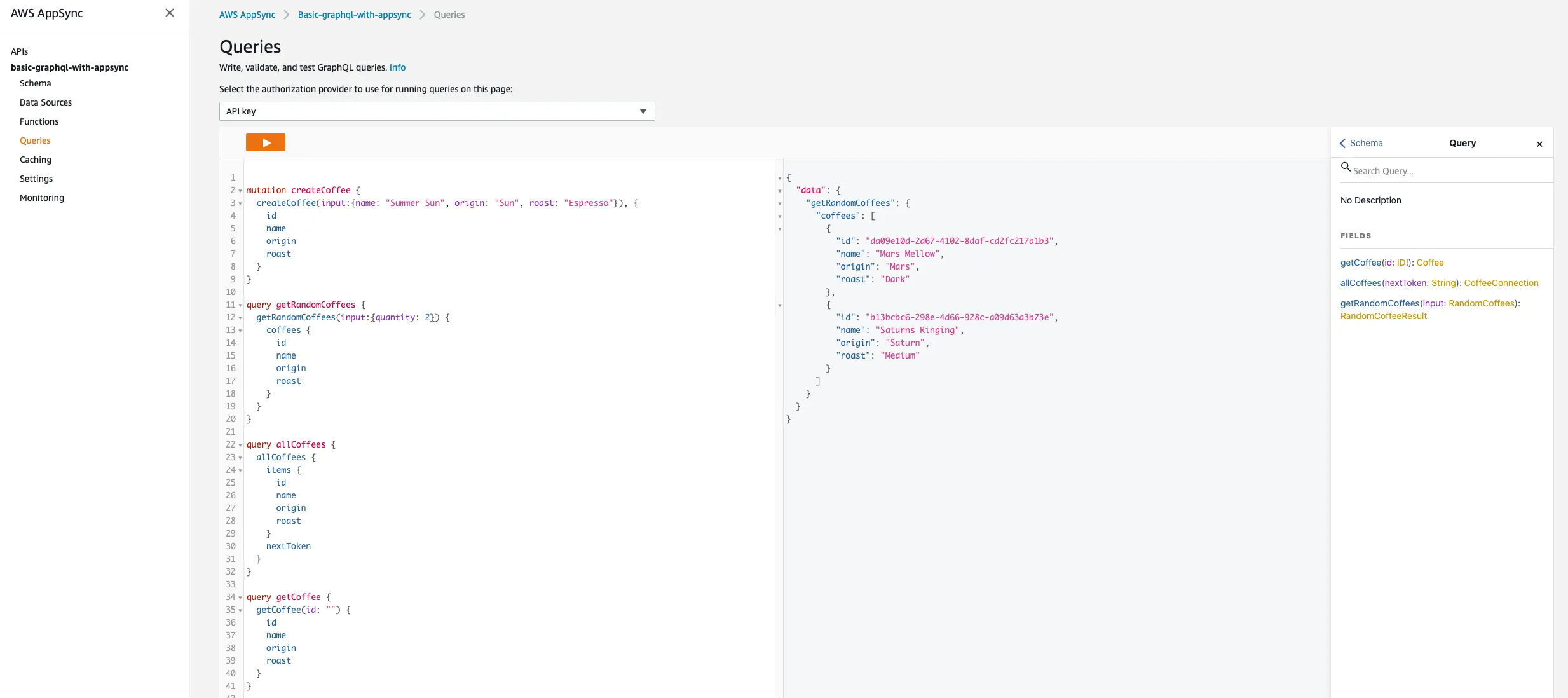
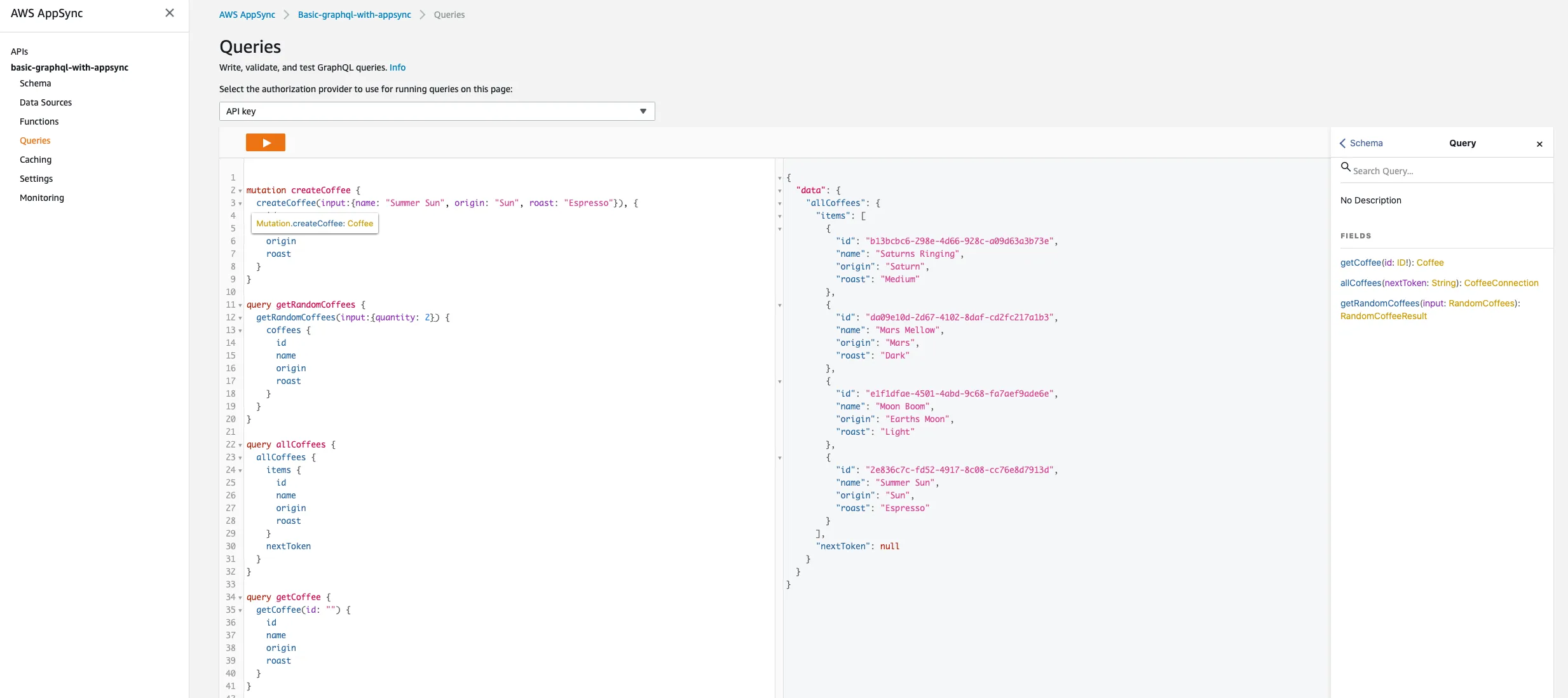
The easiest way to test this service is just to use the built-in functionality available in AppSync. Open up the AWS Console in a web browser. Then navigate to the AppSync service. Once in there, we should find the application we published through CloudFormation. Once inside the application, we can select the Queries section. Then below is a list of some queries and mutations we can perform to validate our application is running and working.
Create some coffee ☕️☕️☕️☕️☕️ → ☁️
Get some random coffee ☁️ → ☕️☕️☕️
Get all coffee ☁️ → ☕️☕️☕️☕️☕️
Get a coffee ☁️ → ☕️